Optimal Shop 20+4 Pin LCD Power Alternatives: 6 Similar Picks Compared
As an Amazon Associate we earn from qualifying purchases. Links on this page are affiliate links.
You are looking for optimal shop 20 4 pin LCD computer alternatives that match the core diagnostic functions of the original model. The Optimal Shop tester provides clear voltage readouts and audible fault alerts in a durable aluminum shell. It supports eight connector types, including ATX, SATA, and PCIe, making it a versatile tool for bench diagnostics. The built-in buzzer helps you quickly identify PG signal failures without needing separate meters.
However, you might prefer a different spec, size, feature, or brand for your specific workflow. Some users need a lighter footprint, while others prioritize a larger display or additional connector support. The alternatives in this list were chosen because their specs overlap with the original. Each option offers LCD readouts and ATX compatibility, ensuring you have reliable options regardless of your exact requirements.
Our top pick: Optimal Shop 20+4 Pin LCD Power Supply Tester.
How each alternative compares
Optimal Shop LCD ATX Power Supply Tester
This Optimal Shop variant shares the same aluminum housing and LCD interface as the top pick, but it arrives in a golden finish rather than black. The core functionality remains identical, offering multi-connector diagnostics and buzzer alerts for ATX units. You get the same reliable voltage verification without significant hardware changes. Choose this version if you prefer the aesthetic of gold hardware or if it is priced lower than the standard black model. It provides the same essential benchtop utility for desktop power supply troubleshooting, ensuring you do not sacrifice diagnostic clarity for color preference.
Comidox 20/24 Pin LCD Power Supply Tester
The Comidox model offers a similar LCD readout for main rails but differs in how it handles secondary connectors. While the original displays precise voltages for SATA and PCIe lines, this tester relies on simple light indicators for those secondary checks. It is slightly larger at 4.95 inches long. You should pick this if you need a budget-friendly option for basic ATX rail verification. It gives up the numeric precision on secondary connectors but retains the audible alarm feature. This makes it suitable for quick checks where you only need to confirm that the primary power lines are active and within range.
ASHATA ATX LCD Power Supply Tester
ASHATA provides a tester with a 0.01V precision screen, which offers finer resolution than the standard LCD found in the original Optimal Shop model. It is also lighter at 2.82 ounces and slightly more compact. This precision helps you verify voltage stability with greater accuracy during bench diagnostics. You should choose this if you require detailed voltage readings for sensitive troubleshooting. It lacks the specific multi-connector support details listed for the original, focusing instead on core ATX voltage verification. The audible fault alarms remain present, ensuring you are alerted to signal failures just like with the top pick.
ASHATA LCD Power Supply Tester
This ASHATA unit mirrors the previous model with identical dimensions and weight, offering 0.01V precision on its LCD display. It shares the same lightweight design and audible warning system. The primary difference is its marketing as a quick multi-form-factor tool, though it shares the same ATX focus as the original. You might pick this if you find it available at a different price point or if you prefer the ASHATA branding. It delivers the same straightforward benchtop troubleshooting capabilities, allowing you to verify standard PC voltage lines quickly. The diagnostic coverage is comparable, making it a viable swap if you value the higher precision screen.
JacobsParts 20/24-Pin LCD Power Supply Tester
JacobsParts includes support for BTX and ITX form factors in addition to standard ATX, whereas the original focuses primarily on ATX and drive connectors. It is slightly heavier at 3.53 ounces. This tester provides direct rail voltage readouts and operates without batteries, similar to the original. You should choose this if you work with non-standard form factors like BTX or ITX. It gives up the specific eight-connector versatility of the original but expands your diagnostic range to other board types. The battery-free operation ensures you can test power supplies without needing external power sources for the device itself.
Yankok Digital PSU Tester with Backlit LCD
Yankok offers a digital tester with a backlit LCD, which aids visibility in low-light workspaces. It supports ATX, ITX, and BTX form factors, providing broader compatibility than the original ATX-focused device. It is battery-free, ensuring safe diagnostics without risking damage to system hardware. You should pick this if you need a simple tool for basic voltage checks across multiple PC types. It lacks the detailed multi-connector support and specific dimensions listed for the original. The backlit screen is a practical addition for technicians working in dim environments, while still delivering the essential audible alerts for power supply faults.
Quick picks
Our 7 picks
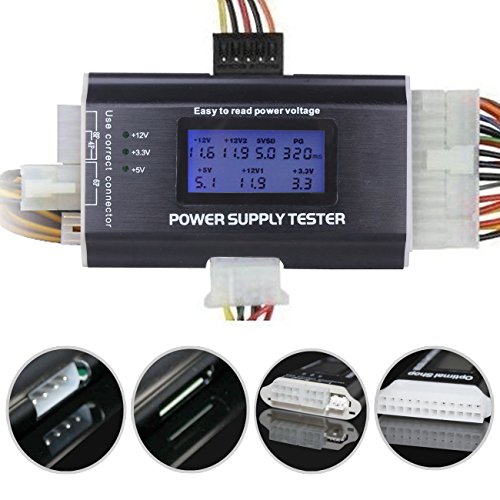
Optimal Shop 20+4 Pin LCD Power Supply Tester
Best for: everyday ATX power supply bench diagnostics
- Form Factor
- ATX
- Display Type
- LCD Display
- Dimensions
- 8.3 × 3.7 × 0.8 inches
- Weight
- 3.2 ounces
View on Amazon: Optimal Shop 20+4 Pin LCD Power Supply Tester
This Optimal Shop unit is an ATX power supply diagnostic tester encased in an aluminum alloy shell. It pairs a 1.8-inch LCD screen for output voltage readouts with an integrated buzzer alarm for Power Good signal failures. You get diagnostic support across eight connector types, including 20-pin, 24-pin, SATA, and PCIe plugs. It suits you if you need a lightweight bench tool for testing standard desktop power connectors.
Pros
- Aluminum alloy housing provides heat dissipation and strength
- 1.8-inch LCD screen displays output voltage lines clearly
- Buzzer alarm sounds when the power supply PG signal fails
- Tests 8 connector varieties including SATA, IDE, and PCIe 6-pin
- Lightweight build weighs 3.2 ounces
Cons
- LCD screen requires a connected 20-pin or 24-pin cable to power on
- Only tests 6-pin PCIe connectors directly, not 8-pin PCIe cables
Good fit if
- You need an aluminum-cased diagnostic tool with an audible fault buzzer.
- You want direct voltage readouts for 20-pin or 24-pin ATX power supplies.
- You test legacy drives using 4-pin IDE and floppy connectors alongside SATA.
Skip if
- You need to test 8-pin PCIe graphics power cables directly.
- You want to run peripheral cable tests without plugging in the main 20/24-pin connector.
Verdict: Optimal Shop 8-in-1 LCD Power Supply Tester delivers clear voltage readouts and audible fault alerts in a solid aluminum shell. It gives you essential diagnostic coverage across common ATX, drive, and PCIe power lines.

Optimal Shop LCD ATX Power Supply Tester
Best for: desktop ATX power supply diagnostics
- Form Factor
- ATX
- Display Type
- LCD Display
This ATX power supply tester features an aluminum alloy shell and an 8-in-1 connector interface. You can check 20-pin, 24-pin, SATA, IDE HDD, 4-pin floppy, 4-pin or 8-pin, and 6-pin PCI-e connections. The 1.8-inch LCD screen shows output voltages directly, while an integrated buzzer sounds an audible alarm if the power good signal fails. It suits you if you need a durable diagnostic tool for standard desktop power supplies.
Pros
- Aluminum alloy housing resists corrosion and dissipates heat
- 1.8-inch LCD screen displays real-time voltage readings
- Audible buzzer sounds when the PG signal fails
- Supports 20-pin, 24-pin, SATA, floppy, and 6-pin PCI-e leads
Cons
- Screen requires the 20-pin or 24-pin connector to power on
- Secondary peripheral leads use indicator lights rather than digital LCD readouts
Good fit if
- You need an aluminum-cased tester for desktop ATX units
- You want audible alerts when PG timing values fail
- You test legacy 4-pin floppy or IDE drives alongside SATA connectors
Skip if
- You require an independently battery-powered diagnostic tool
- You want numerical display metrics for peripheral cables instead of indicator lights
Verdict: Optimal Shop 1.8-Inch LCD Power Tester provides multi-connector ATX diagnostics inside a rigid aluminum housing. Its built-in buzzer alarm and screen let you verify rail voltages and signal integrity without separate meters.

Comidox 20/24 Pin LCD Power Supply Tester
Best for: basic bench checks on desktop power units
- Form Factor
- ATX
- Display Type
- LCD Display
This diagnostic tool checks ATX, BTX, ITX, and TFX power supplies. You plug in your 20-pin or 24-pin main connector to view 3.3V, +5V, +12V, -12V, +5VSB, and PG values directly on the screen with +/-0.01V accuracy. An integrated buzzer sounds if outputs fall outside safe thresholds. It suits you if you need a compact diagnostic unit for standard desktop power units.
Pros
- Measures ATX, BTX, ITX, and TFX power supply units
- Voltage readout accuracy within +/-0.01V on LCD screen
- Audible buzzer alarm sounds when parameters exceed normal limits
- Supports SATA, 4-pin, 8-pin, floppy, and 6-pin PCI-E connections
Cons
- Shows numeric voltage on LCD only for 20-pin or 24-pin connectors
- Peripheral, SATA, and PCI-E leads use indicator lights instead of digital LCD values
Good fit if
- You need numeric voltage and PG readings for 20-pin or 24-pin connectors.
- You want an audio alarm warning when rail voltages drift out of range.
- You work with multiple form factors including ATX, BTX, ITX, and TFX.
Skip if
- You need numeric LCD voltage readouts for individual SATA or PCI-E lines.
- You require dedicated testing for 8-pin PCI-E graphics cables.
Verdict: Comidox 20/24 Pin LCD Power Supply Tester delivers clear main rail readouts and audio alarms for standard desktop supplies. Its secondary lead checks rely on light indicators rather than numeric LCD values.

ASHATA ATX LCD Power Supply Tester
Best for: benchtop voltage checks on standard ATX supplies
- Form Factor
- ATX
- Display Type
- LCD Display
- Dimensions
- 3.94 × 1.97 × 0.79 inches
- Weight
- 2.82 ounces
The ASHATA LCD PC Power Supply Tester diagnoses your desktop power unit across key rails. It reads +12V, -12V, +5V, -5V, +3.3V, standby voltage, and power good signals directly on an LCD screen with 0.01V measurement precision. An integrated buzzer alerts you when voltages drift outside normal ranges. It fits standard 20-pin and 24-pin ATX connections alongside SATA, floppy, and PCIe 6-pin leads, making it practical for routine bench diagnostics.
Pros
- Measures voltage with 0.01V precision across primary ATX rails
- Built-in buzzer and flashing screen indicate abnormal voltages
- Tests 20-pin, 24-pin, SATA, 4-pin, 8-pin, floppy, and PCIe 6-pin leads
Cons
- PCIe testing is limited to 6-pin connectors
- Does not test modern 12VHPWR connectors
Good fit if
- You need audible buzzer alerts whenever voltage drops or spikes.
- You want 0.01V precision readings for standard ATX rails and PG timing.
- You test systems equipped with legacy floppy or standard SATA connections.
Skip if
- You need to test 8-pin PCIe or high-power 12VHPWR graphics cables.
- You require artificial load testing rather than open-circuit voltage verification.
Verdict: ASHATA LCD PC Power Supply Tester provides quick diagnostic readings and audible fault alarms for desktop units. Its 0.01V precision screen ensures rapid verification of standard ATX voltage lines.

ASHATA LCD Power Supply Tester
Best for: quick multi-form-factor benchtop PSU checks
- Form Factor
- ATX
- Display Type
- LCD Display
- Dimensions
- 3.94 × 1.97 × 0.79 inches
- Weight
- 2.82 ounces
The ASHATA LCD Power Supply Tester checks ATX, BTX, ITX, and TFX units using a built-in LCD screen and buzzer alarm. It displays rail voltages to 0.01V precision alongside PG delay values when you connect a 20-pin or 24-pin motherboard cable. At 3.94 inches long and 2.82 ounces, this compact diagnostic tool suits you if you need fast voltage verification across standard PC power cables without carrying a separate multimeter.
Pros
- LCD displays voltages with 0.01V accuracy and PG values
- Built-in buzzer sounds an automatic audible fault alarm
- Supports ATX, BTX, ITX, and TFX form factors
- Compact 3.94-inch body weighs 2.82 ounces
Cons
- SATA, IDE, and PCI-E ports rely on indicator lights rather than LCD voltage readouts
- LCD voltage display requires connecting the 20-pin or 24-pin connector
Good fit if
- You need digital voltage and PG readouts for ATX, BTX, ITX, or TFX power supplies.
- You prefer an audible buzzer alert for quick power supply status checks.
- You want a pocket-sized tester weighing under 3 ounces.
Skip if
- You need numerical voltage readings directly on SATA, IDE, or PCI-E lines.
- You want to test peripheral cables without connecting the main 20-pin or 24-pin plug.
Verdict: ASHATA LCD Power Supply Tester delivers fast, accurate voltage readouts and audible warnings for standard PC form factors. It provides straightforward benchtop troubleshooting in a lightweight footprint.

JacobsParts 20/24-Pin LCD Power Supply Tester
Best for: battery-free ATX, BTX, and ITX voltage testing
- Form Factor
- ATX
- Display Type
- LCD Display
- Weight
- 3.53 ounces
View on Amazon: JacobsParts 20/24-Pin LCD Power Supply Tester
The JacobsParts 20+4 Pin LCD Power Supply Tester is a diagnostic tool for checking desktop computer power units. It features a digital LCD screen to report readings for +3.3V, +5V, +VSB, and +12V rails directly from 20-pin or 24-pin ATX connectors. Measuring 4.75 by 2.5 inches and weighing 3.53 ounces, it operates without batteries. It suits you if you need to verify ATX, BTX, or ITX units before connecting them to hardware.
Pros
- Operates directly from the power supply with no batteries required
- Digital LCD screen provides clear voltage readouts
- Tests +3.3V, +5V, +VSB, and +12V voltage lines
- Works with ATX, BTX, and ITX power supplies
Cons
- Does not list negative voltage rail monitoring
- Package contents include only the tester unit without auxiliary cables
Good fit if
- You need to test ATX, BTX, or ITX power supplies without using batteries.
- You want a digital LCD display to monitor +3.3V, +5V, +VSB, and +12V outputs.
Skip if
- You need negative rail verification such as -12V testing.
- You require additional testing adapter cables bundled in the box.
Verdict: JacobsParts 20+4 Pin LCD Power Supply Tester delivers direct rail voltage readouts on an LCD display for ATX, BTX, and ITX form factors. It provides battery-free diagnostic checks to help prevent damage to system hardware.

Yankok Digital PSU Tester with Backlit LCD
Best for: basic voltage checks on ATX ITX BTX PSUs
- Form Factor
- ATX
- Display Type
- LCD Display
The Yankok digital power supply tester checks ATX, ITX, and BTX units via a 20 or 24-pin connector. It displays +5 VSB, +12V, +3.3V, and +5V on a backlit LCD. The device draws power from the PSU, so you do not need batteries. It includes an audible alarm for voltage failures and supports SATA, IDE, and PCI-Express connectors. This tool suits hobbyists and technicians needing quick voltage verification.
Pros
- Backlit LCD shows +5 VSB, +12V, +3.3V, and +5V
- Compatible with ATX, ITX, and BTX power supplies
- Powered directly by the PSU connector, no batteries required
- Audible alarm signals voltage failures
- Supports SATA, IDE, FDD, and PCI-Express connectors
Cons
- Only tests standard ATX voltages, not high-load stability
- Lacks detailed current or power reading capabilities
- No data logging or USB connectivity mentioned
Good fit if
- You need a quick way to verify basic PSU voltages
- You work with ATX, ITX, or BTX power supplies
- You want a tester that does not require separate batteries
Skip if
- You require precise current or wattage measurements
- You need to test non-standard or server-grade PSUs
- You want advanced data logging features
Verdict: Yankok ATX ITX BTX PSU Tester offers essential voltage checks for standard PC power supplies. It fits hobbyists and technicians who need a simple, battery-free tool for basic ATX, ITX, or BTX verification.
Specifications side by side
| Spec | Optimal Shop 20+4 Pin LCD Power Supply Tester | Optimal Shop LCD ATX Power Supply Tester | Comidox 20/24 Pin LCD Power Supply Tester | ASHATA ATX LCD Power Supply Tester | ASHATA LCD Power Supply Tester | JacobsParts 20/24-Pin LCD Power Supply Tester | Yankok Digital PSU Tester with Backlit LCD |
|---|---|---|---|---|---|---|---|
| Form Factor | ATX | ATX | ATX | ATX | ATX | ATX | ATX |
| Display Type | LCD Display | LCD Display | LCD Display | LCD Display | LCD Display | LCD Display | LCD Display |
| Dimensions | 8.3 × 3.7 × 0.8 inches | not specified | not specified | 3.94 × 1.97 × 0.79 inches | 3.94 × 1.97 × 0.79 inches | not specified | not specified |
| Weight | 3.2 ounces | not specified | not specified | 2.82 ounces | 2.82 ounces | 3.53 ounces | not specified |
| Color | Black | Golden | Black | default | default | Black | not specified |
| Model | Optimal Shop | Optimal Shop | not specified | not specified | not specified | not specified | YKNT-PST-ATX04 |
| Size | not specified | not specified | 126x64x18.5mm/4.95x2.51x0.72inch | not specified | not specified | not specified | not specified |
You can evaluate thermaltake 7 bladed 92mm 4 pins pwm alternatives if your build requires dedicated processor cooling.
Frequently asked questions
Do these LCD testers require batteries to operate?
Most models in this list, including the JacobsParts and Yankok units, operate without batteries. They draw power directly from the ATX, ITX, or BTX connectors during testing. This battery-free design helps prevent accidental damage to your system hardware. However, you should check the specific product data for each unit to confirm its power source, as some older or different variants may rely on internal cells.
Can these testers verify secondary power rails like SATA or PCIe?
Coverage varies by model. The Optimal Shop 8-in-1 tester provides essential diagnostic coverage across common ATX, drive, and PCIe power lines. Other units, such as the Comidox model, focus on clear main rail readouts with secondary leads that rely on light indicators rather than numeric LCD values. You should review the specific attributes of each tool to ensure it supports the connectors you need to verify.
Which tester offers the highest voltage precision?
The ASHATA LCD PC Power Supply Tester features a 0.01V precision screen. This allows for rapid verification of standard ATX voltage lines with high accuracy. Other models provide clear voltage readouts but do not specify this level of decimal precision in their published specifications. If you need fine-grained voltage monitoring, the ASHATA unit is the strongest candidate based on the available data.
Are these tools suitable for non-ATX form factors like ITX or BTX?
Yes, several options support multiple form factors. The JacobsParts tester delivers direct rail voltage readouts for ATX, BTX, and ITX units. The Yankok model also offers essential voltage checks for ATX, ITX, and BTX power supplies. While most listed items are ATX-focused, these specific models provide the flexibility needed for smaller or alternative motherboard layouts without requiring separate diagnostic hardware.
Do these testers include audible fault alerts?
Most units in this comparison include built-in buzzer alarms or audible fault alerts. The Optimal Shop models and the ASHATA tester both provide audible warnings to signal voltage issues. This feature allows you to verify signal integrity without constantly staring at the screen. The Comidox model also mentions audio alarms for standard desktop supplies, ensuring you are notified of potential problems quickly.
What is the typical weight of these diagnostic tools?
These testers are generally lightweight and portable. The Optimal Shop 8-in-1 model weighs 3.2 ounces, while the ASHATA units weigh 2.82 ounces. The JacobsParts tester is slightly heavier at 3.53 ounces. This compact footprint makes them easy to store in a toolbox or carry to a benchtop setup. You can rely on these small dimensions for convenient handling during routine PC diagnostics.