Best LINKUP PC Power Supplies: 3 Models Compared
As an Amazon Associate we earn from qualifying purchases. Links on this page are affiliate links.
When searching for the best LINKUP PC power supplies, you will find a range of high-quality extension cables. This guide compares 3 models from the brand, focusing strictly on the specifications published on their listings. LINKUP offers various sizes and colors, including 30cm and 50cm options in white, orange, and red. These extensions are designed for short CPU power connections or longer GPU runs.
The top pick is the LINKUP 30cm White 8-Pin CPU Extension Cable. It leads because it fits builders who need a short, durable cable with organized routing. This choice is ideal for tight spaces where a 50cm cable would be too long. You can rely on these specs to find the right fit for your build.
Quick picks
| # | Product | Best for | Price |
|---|---|---|---|
| 1 | LINKUP 30cm White 8-Pin CPU Extension Cable Best overall | Short CPU power cable extensions | Check price of LINKUP 30cm White 8-Pin CPU Extension Cable on Amazon |
| 2 | LINKUP AVA 30cm Sleeved PSU Cable Extension Kit Best premium | custom modular cable training | Check price of LINKUP AVA 30cm Sleeved PSU Cable Extension Kit on Amazon |
| 3 | LINKUP 50cm Red GPU Extension Cable Best budget | Red-themed builds needing extra GPU cable length | Check price of LINKUP 50cm Red GPU Extension Cable on Amazon |
Our 3 picks

LINKUP 30cm White 8-Pin CPU Extension Cable
Best for: Short CPU power cable extensions
- Warranty
- 1 Year
- Dimensions
- 5.91 × 3.15 × 0.79 inches
- Weight
- 1.6 ounces
View on Amazon: LINKUP 30cm White 8-Pin CPU Extension Cable Affiliate link
This is a single 8-pin CPU power extension cable designed for modular power supplies. It uses 18AWG tinned copper wires inside a braided sleeve for durability. The 30cm length helps manage cable routing in your case. You can choose from 17 colors to match your build. It includes cable combs for organization. The unit weighs 1.6 ounces and comes with a one-year warranty.
Pros
- Uses 18AWG UL 1015 tinned copper wires
- Features a high-density flexible braided sleeve
- Includes cable combs for clean routing
- Available in 17 color options
Cons
- Limited to 30cm length
- Single 8-pin connector only
- Cables do not arrive pre-curved
Good fit if
- You need a short extension for your CPU power connector
- You want to match your build color scheme
- You prefer braided sleeves for cable management
Skip if
- You require a 50cm length for deeper cases
- You need a GPU power extension instead
- You want pre-curved cables for immediate installation
Verdict: LINKUP 30cm White 8-Pin CPU Extension Cable fits builders who need a short, durable CPU cable with organized routing. It is ideal for tight spaces where a 50cm cable would be too long.

LINKUP AVA 30cm Sleeved PSU Cable Extension Kit
Best for: custom modular cable training
- PCIe Connector Type
- 6+2-Pin
- Warranty
- 1-Year
- Device Compatibility
- PCs
- Dimensions
- 12.6 × 5.91 × 0.79 inches
- Weight
- 14.5 ounces
View on Amazon: LINKUP AVA 30cm Sleeved PSU Cable Extension Kit Affiliate link
This LINKUP AVA extension cable features 18AWG tinned copper wires inside a high-density flexible braided sleeve. It bundles two 4+4-Pin CPU cables, three 6+2-Pin GPU cables, and one 24-Pin motherboard cable. The 30cm length and orange color match specific build needs. You get cable combs for routing. This kit suits users who want a rugged, modular look for their power supply connections without pre-curved stiffness.
Pros
- 18AWG UL 1015 tinned copper wires for robust conductivity
- Includes 2 CPU, 3 GPU, and 1 24-Pin motherboard cables
- High-density flexible protective sleeve allows for easy routing
- Comes with cable combs to organize your build
Cons
- Cables do not arrive pre-curved and require training
- Warranty is limited to one year
- Single 8-Pin GPU variant is stiff
Good fit if
- You need a bundled set of CPU and GPU extensions
- You want to train cables for a custom look
- You prefer a 30cm length for your case
Skip if
- You need pre-curved cables that hold shape instantly
- You only require a single GPU extension cable
- You want a warranty longer than one year
Verdict: LINKUP AVA 30cm Braided PSU Extension Cable offers a complete bundle for modular builds. It fits users who want to train their own cables for a clean, professional appearance.
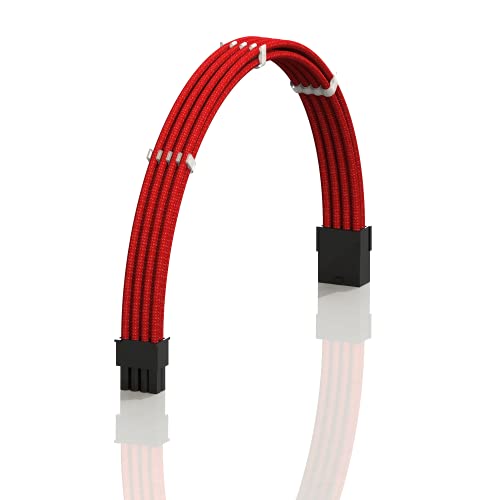
LINKUP 50cm Red GPU Extension Cable
Best for: Red-themed builds needing extra GPU cable length
- PCIe Connector Type
- 8-pin (6+2)
- Warranty
- 1-Year
- Dimensions
- 5.91 × 3.15 × 0.79 inches
- Weight
- 1.7 ounces
View on Amazon: LINKUP 50cm Red GPU Extension Cable Affiliate link
This LINKUP 50cm Red GPU extension cable adds reach for graphics cards needing extra power. It features an 8-pin (6+2) PCIe connector and 18 AWG tinned copper wires inside a dense braided sleeve. The stiff design resists sagging while the included combs help organize wires. You get a 1-year warranty for support. It suits builders who want clean cable management and a specific color match for their build.
Pros
- 50cm length provides extended reach
- 18 AWG tinned copper wires for durability
- Includes precision-fit cable combs for organization
- 1-year limited warranty coverage
Cons
- Firm structure may not fit all GPU backplates
- Only provides a single 8-pin connector
- Limited to 50cm length for tight spaces
Good fit if
- You need extra reach for your GPU power connection
- You want a red color to match your build
- You prefer stiff cables that hold their shape
Skip if
- You have a GPU with a thick backplate that blocks retention clips
- You need a shorter 30cm cable for tight cases
- You require multiple connectors on one extension
Verdict: LINKUP 50cm Red GPU Extension Cable offers reliable reach and clean aesthetics for mid-size builds. It is ideal for users who prioritize cable stiffness and color coordination over compactness.
Specifications side by side
| Spec | LINKUP 30cm White 8-Pin CPU Extension Cable | LINKUP AVA 30cm Sleeved PSU Cable Extension Kit | LINKUP 50cm Red GPU Extension Cable |
|---|---|---|---|
| PCIe Connector Type | not stated | 6+2-Pin | 8-pin (6+2) |
| Warranty | 1 Year | 1-Year | 1-Year |
| Device Compatibility | not stated | PCs | not stated |
| Dimensions | 5.91 × 3.15 × 0.79 inches | 12.6 × 5.91 × 0.79 inches | 5.91 × 3.15 × 0.79 inches |
| Weight | 1.6 ounces | 14.5 ounces | 1.7 ounces |
| Size | CPU - 8-pin - 30cm | 30cm | 50cm |
| Color | White 8P CPU | Orange | Red |
| Model | e4496bae-3aa1-4agh-ad0c-99357d51ea6e | 200 | AVA 50cm - Red |
LINKUP Cable Lineup Overview
The LINKUP range focuses on cable extensions rather than power supplies. You can choose based on length, connector type, and color. Shorter cables suit tight builds, while longer ones help with routing. Color options let you match your theme. This guide compares 3 models. The first option is the LINKUP 30cm White 8-Pin CPU Extension Cable. It fits builders needing short CPU connections. The second is the LINKUP AVA 30cm Sleeved PSU Cable Extension Kit. It works for training modular cables. The third is the LINKUP 50cm Red GPU Extension Cable. It helps with GPU reach in red builds. You pick the size and color that fit your case.
Who LINKUP Cables Suit
LINKUP targets builders who need specific cable extensions for clean builds. The range covers short CPU extensions and modular cable kits. You can choose between 30cm and 50cm lengths. Colors include white, orange, and red to match your theme. The brand focuses on physical cable management rather than power supply units. None of these products offer lighting effects or smart connectivity. If you need a complete power supply, this brand does not provide one. You only get the cables. This range fits those who already have a PSU and want better routing. It is ideal for tight spaces or themed cases where standard cables look out of place.
How to Choose the Right LINKUP Cable
-
Match Connector Types
You must verify the connector type before purchasing. The LINKUP 30cm White 8-Pin CPU Extension Cable is designed specifically for CPU power delivery. This 8-pin configuration ensures proper power flow to your processor. Do not use GPU cables for CPU sockets, as the pin layout differs. Check your motherboard manual to confirm the required connector. Using the wrong cable can prevent your system from booting or cause damage. Always align the connector shape with the socket on your motherboard to ensure a secure fit.
-
Select Appropriate Length
Cable length determines how easily you can route wires. The 30cm models, like the White CPU cable and Orange AVA kit, fit tight spaces well. They reduce excess slack that can block airflow. The 50cm Red GPU cable offers extra reach for larger cases. Measure the distance between your PSU and the component before buying. Shorter cables improve airflow and aesthetics in small form factor builds. Longer cables are better for standard ATX cases with deep PSU shrouds. Choose the length that allows clean routing without tension.
-
Choose Your Color Theme
Color coordination enhances the visual appeal of your build. LINKUP offers white, orange, and red options. The white 8-pin CPU cable suits light-themed builds. The orange AVA kit provides a bold contrast for dark cases. The red GPU cable matches red-themed graphics cards. Select a color that complements your case and other components. Consistent coloring creates a professional appearance. Mismatched colors can look cluttered inside the case. Pick the color that best fits your overall design scheme for a cohesive look.
-
Consider Build Modularity
Modular power supplies benefit from extension kits. The LINKUP AVA 30cm Sleeved Kit is ideal for custom cable training. It allows you to create clean, uniform cables. This kit helps manage multiple connections in modular builds. Non-modular PSUs do not need these extensions. If you have a fully modular PSU, use these cables to hide wires. This improves airflow and makes the build easier to maintain. Ensure your PSU has enough ports for the extension kit. Custom cables also simplify future upgrades or component changes.
-
Check Physical Dimensions
Physical size affects fitment in your case. The White CPU cable measures 3.15 inches wide. The Orange AVA kit is larger at 12.6 inches long. These dimensions impact how much space the cables occupy. Ensure your case has enough room for the cable bundle. Tight cases may require shorter or thinner cables. Check the width and height of the cable packaging. Larger packages indicate bulkier cables. Plan your cable routing around these dimensions. Proper planning prevents interference with other components like RAM or coolers.
Frequently asked questions
What is the best LINKUP cable for tight PC cases?
The LINKUP 30cm White 8-Pin CPU Extension Cable is the top choice for compact builds. It measures 30cm in length, making it ideal for tight spaces where longer cables would be too bulky. The cable weighs only 1.6 ounces, adding minimal weight to your build while ensuring organized routing for your processor power connection.
Which LINKUP kit is best for custom cable training?
The LINKUP AVA 30cm Sleeved PSU Cable Extension Kit is designed for builders who want to train their own cables. This bundle includes orange sleeved extensions that help achieve a clean, professional appearance. It is a complete solution for modular builds, allowing you to manage cable routing effectively without excess bulk.
Is there a red GPU extension cable available from LINKUP?
Yes, the LINKUP 50cm Red GPU Extension Cable is available for red-themed builds. This cable provides reliable reach for mid-size cases, prioritizing cable stiffness and color coordination. It is a suitable option if you need extra length for your graphics card while maintaining a specific aesthetic theme in your PC case.
How long is the LINKUP CPU extension cable?
The LINKUP 30cm White 8-Pin CPU Extension Cable has a length of 30cm. This specific size is intended for short CPU power connections. It fits well in cases where a 50cm cable would be too long, ensuring that your processor power cable does not interfere with other components or airflow.
What connector type does the LINKUP CPU cable use?
The LINKUP 30cm White 8-Pin CPU Extension Cable uses an 8-pin connector. This configuration ensures proper power flow to your processor. You must verify that your motherboard requires an 8-pin CPU power connection before purchasing this specific cable to ensure compatibility with your system's power delivery needs.
Does LINKUP offer modular cable extension kits?
Yes, the LINKUP AVA 30cm Sleeved PSU Cable Extension Kit is a modular solution. It provides a complete bundle for users building with modular power supplies. The kit includes orange sleeved cables that allow you to create custom lengths and routing paths, helping you achieve a tidy and professional look inside your case.
What color options are available for LINKUP GPU cables?
LINKUP offers red GPU extension cables, such as the 50cm Red GPU Extension Cable. This color option is ideal for builders who prioritize color coordination in their builds. The red sleeving helps match other red-themed components, providing a cohesive aesthetic while delivering the necessary power to your graphics card.
How heavy is the LINKUP 30cm CPU cable?
The LINKUP 30cm White 8-Pin CPU Extension Cable weighs 1.6 ounces. This lightweight design ensures that the cable does not add significant mass to your build. The low weight contributes to easier cable management and reduces strain on the motherboard connector, which is beneficial for maintaining long-term stability in your system.