Ejoyous LCD Power Supply Tester Review: Specs, Pros and Cons
As an Amazon Associate we earn from qualifying purchases. Links on this page are affiliate links.
This ejoyous computer power supply review focuses on the Ejoyous LCD Power Supply Tester. It helps you check if your PSU is working correctly. The device features an LCD display for clear readings. It also supports multiple form factors like ATX, ITX, BTX, and TFX. You connect it to the 20-pin or 24-pin ATX connector. The screen shows voltage and PG values. If a value is out of range, the buzzer sounds. This tool is designed for quick diagnostics. It displays parameters intuitively. You can see if each rail is normal. The tester is a practical addition to your setup. It simplifies the process of verifying power delivery.
What stands out
- LCD screen displays voltage and PG values for ATX, ITX, BTX, and TFX connectors
- Audible buzzer warning and flashing display when voltage exceeds normal limits
- Supports 20-pin, 24-pin ATX, SATA, 4-pin, 8-pin, and 6-pin PCI-E interfaces
- Light indicators for external SATA, P6, and P8 connectors without LCD voltage data
Who it fits
Good fit for
This tester suits builders and technicians who need to verify PSU stability quickly. If you work with various form factors like ITX or TFX, the broad interface support is useful. The LCD display helps you read specific voltages without guesswork. The audible alarm alerts you to faulty rails immediately. It is ideal for diagnosing non-booting systems or unstable builds. You will appreciate the clear visual feedback on each power rail. The tool is best for those who want to ensure their power supply delivers correct voltage before installation.
Who should skip it
You should look elsewhere if you need deep analysis of ripple or noise. This device only shows voltage and PG status. It does not provide advanced metrics. If you require testing for SATA or IDE cables only, note that voltage is not displayed for these external connectors. The light indicators are limited to basic presence. Users needing detailed power quality data will find this tool insufficient. It is a basic diagnostic tool, not a comprehensive lab instrument. Consider a more advanced tester if you need precision beyond simple voltage checks.
Verdict: The Ejoyous LCD Power Supply Tester offers a straightforward way to check basic PSU health. Its LCD display and audible warnings make it a practical choice for quick diagnostics.
Key specs explained for Ejoyous tester
Display Type: LCD Display
The unit uses an LCD screen to show readings. This lets you see voltage levels and Power Good signals clearly without guessing. You get a direct visual check of your power supply's health. This is useful if you prefer digital readouts over simple LED lights. It helps you verify stability during testing sessions.
Form Factor: ATX
This tester is designed for ATX power supplies, which are standard in most desktop PCs. It also lists support for ITX, BTX, and TFX formats. This means you can use it for various common computer builds. If you work with standard desktop hardware, this compatibility covers your main needs for PSU diagnostics.
Support 20Pin, 24Pin ATX interface
The device connects to both 20-pin and 24-pin ATX power connectors. This covers older and newer standard power supplies. You do not need separate adapters for different motherboard types. This flexibility allows you to test a wider range of systems. It simplifies the process when you have multiple power units to check.
Support SATA interface / 4Pin, 8Pin interface / PCI-E 6Pin interface
The tester checks output wires for SATA, 4-pin, 8-pin, and PCI-E graphics cards. It displays status via lights for these connections. This helps you verify that individual cables deliver power correctly. You can identify faulty rails or connectors quickly. This feature is essential for building or repairing systems with multiple power demands.
Model: Ejoyousgg5720uhvb
This is the specific model identifier for this tester. It distinguishes this unit from other versions or brands. You can use this code to find exact manuals or replacement parts. It ensures you are referencing the correct hardware specifications. This helps when comparing it against other testers in the market.
Design and build details
According to the listing, the Ejoyous LCD Power Supply Tester is built for direct connection to the ATX connector of a power supply. This design allows you to easily and intuitively know whether the output of each power supply is normal. The unit features an LCD display that shows various voltage and PG values. This screen lets you quickly detect the performance of your computer power supply without needing additional monitors or software. The device supports multiple form factors, including ATX, ITX, BTX, and TFX. This versatility means you can use it with a wide range of computer cases and power units. You do not need to worry about compatibility issues when testing different builds.
The tester also measures output wires for P4, P6, P8, SATA, and IDE connectors. External DIE, SATA, P6, and P8 connections are indicated by light displays. However, the LCD voltage display only appears when connecting to the 24-pin or 20-pin interface. This distinction helps you understand what information is available for each connection type. When parameters exceed normal values, the buzzer sounds a warning, and the corresponding value flashes on the screen. This automatic alarm system ensures you are immediately aware of potential issues. The device supports various interfaces, including SATA, 4-pin, 8-pin, PCI-E graphics card 6-pin, floppy drive, and Xeco power interfaces. This comprehensive support makes it a practical tool for technicians who work with diverse hardware configurations. The build focuses on functionality, providing clear visual and audio feedback for accurate diagnostics.
Setup and daily operation guide
Setting up the Ejoyous LCD Power Supply Tester is straightforward. You simply connect the device to the ATX connector of your power supply. This direct connection allows you to quickly determine if the output is normal. The unit supports multiple form factors, including ATX, ITX, BTX, and TFX. This versatility means you can use it with a wide range of computer power supplies without needing adapters for the main board connection.
Once connected, the LCD display becomes your primary interface. It shows various voltage levels and Power Good (PG) values. You get immediate visual feedback on the health of your power supply. The screen displays voltage for each rail, giving you a clear picture of performance. If any parameter exceeds the normal value, the buzzer sounds a warning. The corresponding value on the LCD will also flash to alert you. This automatic alarm system helps you catch issues without constant monitoring.
For peripheral connections, the tester measures output wires for P4, P6, P8, SATA, and IDE interfaces. External connectors like SATA, P6, and P8 use light displays rather than the LCD screen. You only get voltage readings on the LCD when connected to the 20-pin or 24-pin ATX interface. The device also supports PCI-E graphics card 6-pin interfaces and floppy drive connectors. This comprehensive coverage allows you to check nearly all standard power delivery points. Daily use involves plugging in, reading the screen, and noting any alarms. It is a practical tool for verifying PSU stability during builds or repairs.
Before You Buy This Tester
Before purchasing the Ejoyous LCD Power Supply Tester, verify your power supply form factor. It supports ATX, ITX, BTX, and TFX units. You must ensure your PSU has a standard 20-pin or 24-pin main connector. The device connects directly to this interface for primary voltage readings. Note that SATA, P4, P6, P8, and floppy connectors only show light indicators. They do not display voltage on the LCD screen. You will need these additional cables if you want to check peripheral power rails. Keep the unit clean and store it in a dry place. This tester fits well alongside other PSU options by offering a quick, visual diagnostic tool. It helps you confirm basic output stability without complex equipment. If you frequently swap power supplies or troubleshoot builds, this simple device saves time. It provides immediate feedback via the screen and buzzer alerts. Ensure you understand the difference between the LCD voltage display and the simple LED indicators for other connectors. This clarity helps you avoid confusion during testing.
Check before you buy
- Verify your PSU supports ATX, ITX, BTX, or TFX form factors
- Confirm your power supply has a 20-pin or 24-pin main connector
- Check if you need separate cables for SATA and peripheral testing
- Ensure you understand the difference between LCD voltage and LED indicators
The product at a glance
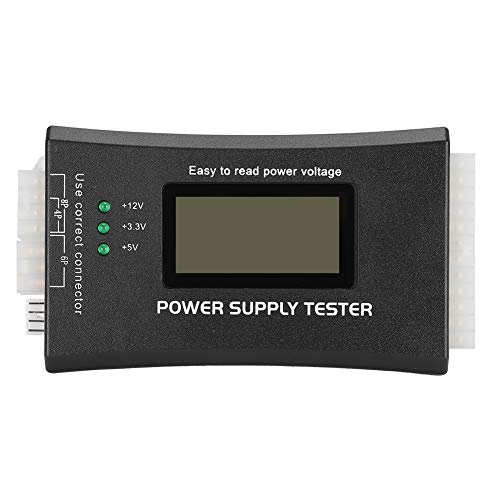
Ejoyous LCD Power Supply Tester
Best for: Verifying ATX power supply voltages with LCD feedback
- Form Factor
- ATX
- Device Compatibility
- PCs
- Display Type
- LCD Display
View on Amazon: Ejoyous LCD Power Supply Tester Affiliate link
This Ejoyous tester checks ATX, ITX, BTX, and TFX power supplies. You connect it to the 20-pin or 24-pin connector to view voltage and PG values on the LCD screen. It also tests SATA, IDE, and PCIe cables with light indicators. The device sounds a buzzer warning if voltages exceed normal limits. It is a practical tool for verifying power supply outputs.
Pros
- LCD display shows voltage and PG values for 20-pin and 24-pin ATX connectors
- Supports ATX, ITX, BTX, and TFX form factors
- Audible buzzer warning when voltage exceeds normal limits
- Light indicators for SATA, IDE, and PCIe cable testing
Cons
- LCD voltage display only works with 20-pin or 24-pin connections
- External cable testing uses lights only, not LCD voltage readings
- No mention of carrying case or protective packaging
Good fit if
- You need to verify ATX power supply voltages quickly
- You work with multiple power supply form factors like ITX or BTX
- You want audible warnings for abnormal voltage outputs
Skip if
- You require voltage readings for external SATA or PCIe cables on the LCD
- You only test non-ATX power supplies
- You prefer a tester without an LCD screen
Verdict: Ejoyous ATX Power Supply Tester with LCD provides clear voltage readings and audible warnings for ATX, ITX, BTX, and TFX power supplies. It suits technicians who need to verify standard ATX connector outputs and cable connections with visual and audio feedback.
Specifications side by side
| Spec | Ejoyous LCD Power Supply Tester |
|---|---|
| Form Factor | ATX |
| Device Compatibility | PCs |
| Display Type | LCD Display |
| Model | Ejoyousgg5720uhvb |
Frequently asked questions
Does the Ejoyous tester support Mini-ITX power supplies?
Yes, the device supports ITX form factors in addition to standard ATX units. It also handles BTX and TFX power supplies. This versatility allows you to test a wide range of desktop and compact computer power supplies using a single tool.
How does the LCD screen help during testing?
The LCD display provides clear voltage readings and status indicators. You can visually verify if each rail is within acceptable limits without guessing. The screen makes it easy to identify specific issues with your power supply outputs quickly and accurately.
Does the tester include audio warnings for faults?
Yes, the unit features audible warnings to alert you to problems. This audio feedback works alongside the visual LCD display. You receive immediate notice if a voltage is out of range or if the Power Good signal is missing.
What model number is this Ejoyous tester?
The specific model number for this unit is Ejoyousgg5720uhvb. You can use this identifier to verify you are looking at the correct product when checking specifications or searching for replacement parts and accessories online.
Can I use this for server power supplies?
This tester is designed for ATX, ITX, BTX, and TFX form factors. It is intended for standard desktop and compact PC power supplies. It may not be compatible with proprietary server power supply connectors or non-standard enterprise-grade units.
Is the tester compatible with 20-pin connectors?
Yes, it connects directly to standard 20-pin or 24-pin main connectors. This ensures you can test older and newer ATX power supplies. The direct interface allows for a straightforward connection to verify primary voltage outputs.
Who should buy this power supply tester?
This tool suits technicians who need to verify standard ATX connector outputs. It is ideal for those who want visual and audio feedback on cable connections. It helps you confirm if a power supply is functioning correctly before installing it in a system.