What Is Fan Size? A Guide for PC Power Supplies Buyers (2026)
As an Amazon Associate we earn from qualifying purchases. Links on this page are affiliate links.
Fan Size Explained for PSU Buyers
The fan size refers to the diameter of the cooling fan inside your power supply unit. Most modern PC power supplies use a 120mm fan. This measurement is the standard across the industry. You will see this number listed in the specifications of almost every unit.
A larger fan can move more air at lower speeds. This design choice helps reduce noise. Smaller fans must spin faster to move the same amount of air. Higher speeds create more audible noise. The 120mm fan strikes a balance between airflow and acoustic performance.
When you look at a product listing, you will find this detail in the technical specs. It is often labeled simply as "Fan Size" or "Cooling Fan." Some manufacturers may also list the fan type, such as a sleeve bearing or a fluid dynamic bearing. These details often appear alongside the size.
Why does this matter to you? Noise is a primary concern for many builders. A larger fan allows the power supply to run quieter under load. It does not mean the unit will never get loud. High-wattage units still generate significant heat. However, the 120mm design is generally more efficient at cooling than smaller alternatives.
Thermal management is the other key factor. Your power supply converts electrical energy. This process generates heat. If the fan is too small, it may struggle to dissipate that heat. Overheating can shorten the lifespan of internal components. The 120mm fan provides adequate surface area for heat exchange.
You do not need to measure the fan yourself. The manufacturer provides this data. You simply need to check the spec sheet. If you prefer a quiet system, look for units with a 120mm fan. This is the most common choice for a reason. It offers reliable cooling without excessive noise. Understanding fan size explained helps you make a confident choice for your build.
Understanding 120mm Fan Specs
120mm Fan
The 120mm fan is the industry standard for cooling power supplies. It fits most ATX cases without issues. This size offers a good balance between airflow and noise. You get reliable thermal management for your components. The Apevia Spirit 600W uses this fan for mid-range builds. It helps keep the unit cool during moderate loads. The Thermaltake Toughpower GX3 850W also features a 120mm fan. This supports its high 850W output efficiently. The Apevia Venus 500W relies on it for basic cooling. This suits simple office or home setups. The ASRock PRO 650W uses the same standard fan size. It ensures stable operation for ATX 3.1 systems. Choosing this fan size means you do not need special case modifications. It is the practical choice for most builders.
Standard Size
Most power supplies use a 120mm fan as their standard cooling solution. This is not a rare or niche specification. You will find this in units from 500W to 850W. The Apevia Spirit 600W is a clear example of this standard. It prioritizes thermal management through this common fan. The Thermaltake Toughpower GX3 850W also follows this trend. It delivers robust power while using the standard fan. The Apevia Venus 500W keeps things simple with this size. It fits users who need basic cooling. The ASRock PRO 650W uses the same approach. It values modern standards over unique cooling designs. This standardization ensures compatibility with a wide range of cases. You can trust this size for general use.
Is 120mm Fan Size Worth It
Who needs it
You should prioritize this standard fan size if you are building a mid-tower or full-tower ATX case. The 120mm diameter is the industry norm, ensuring it fits into the majority of available chassis without clearance issues. This size provides a practical balance between airflow volume and acoustic performance. If you plan to install a high-wattage unit that generates significant heat, the larger surface area of a 120mm fan allows it to move more air at lower rotational speeds. This results in quieter operation under load compared to smaller fans spinning faster. You will also find that replacement parts and accessories for this size are widely available. Choosing this spec simplifies your build process by removing compatibility concerns regarding internal dimensions and mounting points.
Who can skip it
You can ignore fan size details if you are using a compact form factor case, such as SFF or mini-ITX builds. These systems often require smaller fans, like 80mm or 92mm models, due to strict spatial constraints. In these scenarios, the standard 120mm unit will not physically fit inside the enclosure. Focus on total wattage, efficiency ratings, and physical dimensions instead. Also, if you are purchasing a fully modular unit with a zero-RPM mode, the fan size becomes less critical during light loads. The noise difference is negligible when the fan is off entirely. Prioritize cable management and connector types over cooling specifics. Your case compatibility guide should dictate the maximum fan diameter allowed. Do not let this spec drive your decision if space is your primary constraint.
PSU Glossary Terms
Efficiency Rating
This measures how much input power converts to usable output. Ratings like 80 Plus Gold indicate higher efficiency, reducing waste heat and lowering electricity costs during operation.
Form Factor
This defines the physical dimensions and mounting standard of the unit. ATX is the most common size for desktop cases, ensuring compatibility with standard chassis designs.
Modularity
This refers to whether cables are permanently attached or detachable. Fully modular units let you connect only the cables you need, improving airflow and cable management inside your case.
ATX Version
This indicates the revision of the motherboard power specification. Newer versions like ATX 3.0 support modern connectors and power delivery standards for current high-end graphics cards and CPUs.
Voltage Regulation
This describes how steadily the PSU maintains specified voltages under load. Good regulation ensures stable power delivery to sensitive components, preventing instability or crashes during intensive tasks.
Topology
This is the internal circuit design of the power supply. Common types include LLC and DC-DC, which affect efficiency, ripple, and overall power conversion performance under varying loads.
Quick picks
| # | Product | Best for | Price |
|---|---|---|---|
| 1 | Apevia Spirit 600W ATX Power Supply | Mid-range builds needing 120mm fan cooling | Check price of Apevia Spirit 600W ATX Power Supply on Amazon |
| 2 | Thermaltake Toughpower GX3 850W Gold PSU | high-end gaming and workstation builds | Check price of Thermaltake Toughpower GX3 850W Gold PSU on Amazon |
| 3 | Apevia Venus 500W ATX Power Supply | Basic office and home computing setups | Check price of Apevia Venus 500W ATX Power Supply on Amazon |
| 4 | ASRock PRO 650W ATX 3.1 Power Supply | Mid-range builds needing ATX 3.1 compatibility | Check price of ASRock PRO 650W ATX 3.1 Power Supply on Amazon |
Our 4 picks
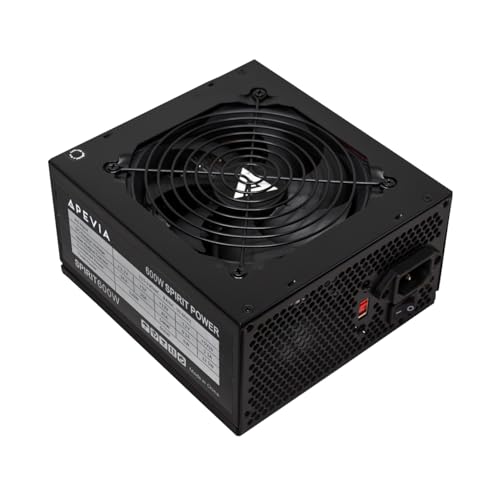
Apevia Spirit 600W ATX Power Supply
Best for: Mid-range builds needing 120mm fan cooling
- Fan Size
- 120mm Fan (what this guide is about)
- Wattage
- 600W
- PCIe Connector Type
- 6+2pin
- Form Factor
- ATX
- Dimensions
- 6.3 × 5.91 × 3.35 inches
View on Amazon: Apevia Spirit 600W ATX Power Supply Affiliate link
The Apevia Spirit 600W power supply features a 120mm auto-thermally controlled fan. It delivers 600W of power with a single 12V rail at 45A. The unit includes standard protections like over-voltage and short-circuit safeguards. Its 120mm fan size helps manage heat effectively for this wattage class. It suits users needing reliable basic ATX power with modern connector flexibility.
Pros
- 120mm auto-thermally controlled fan for heat management
- Single 12V rail provides 45A for high power usage
- Splittable 8-pin CPU and PCIe connectors for compatibility
- Comprehensive heavy-duty protections including over-temperature
Cons
- 600W output is lower than the 650W and 850W options on this list
- Lacks native PCIe 5.1 12V-2x6 connector support found in newer ATX 3.1 models
- No 80 Plus efficiency certification listed in specifications
Good fit if
- You need a 120mm fan PSU for better airflow in your case
- You have a system that requires up to 600W of power
- You want a single 12V rail for stable CPU and GPU power delivery
Skip if
- You require an 80 Plus efficiency rating for power savings
- You are building a high-end PC needing 850W or more
- You want native support for the latest PCIe 5.1 12V-2x6 connectors
Verdict: Apevia Spirit 600W 120mm Fan is a solid choice for mid-range builds prioritizing thermal management via its 120mm fan. It fits users who need reliable 600W output without the premium features of higher-wattage or newer standard models.

Thermaltake Toughpower GX3 850W Gold PSU
Best for: high-end gaming and workstation builds
- Fan Size
- 120mm Fan (what this guide is about)
- Wattage
- 850W
- Efficiency Rating
- 80 Plus Gold
- ATX Version
- ATX 3.1
- PCIe Connector Type
- 12V-2x6
- Warranty
- 5 Year
View on Amazon: Thermaltake Toughpower GX3 850W Gold PSU Affiliate link
This 850W power supply meets ATX 3.1 standards and includes a native 12V-2x6 connector for PCIe 5.1 graphics cards. It features an 80 Plus Gold efficiency rating and a 120mm fan with a fluid dynamic bearing. The unit uses flat cables and offers a 5-year warranty. It suits builders needing high wattage and modern connector support for next-generation hardware.
Pros
- 850W output capacity
- 80 Plus Gold efficiency
- Native 12V-2x6 PCIe connector
- 120mm fluid dynamic bearing fan
- 5-year warranty
Cons
- Larger physical dimensions than lower-wattage models
- Heavier build due to 850W capacity
- No mention of modular cable management
Good fit if
- You need native support for PCIe 5.1 GPUs
- You require high efficiency for power savings
- You are building a high-end gaming PC
Skip if
- You need a smaller 500W or 600W unit
- You are building a low-power office PC
- You require a fully modular cable design
Verdict: Thermaltake Toughpower GX3 850W delivers robust power and modern connectivity for high-end builds. It is ideal for users prioritizing efficiency and PCIe 5.1 readiness over compact form factors.

Apevia Venus 500W ATX Power Supply
Best for: Basic office and home computing setups
- Fan Size
- 120mm Fan (what this guide is about)
- Wattage
- 500W
- PCIe Connector Type
- 6+2 PCI Express
- Form Factor
- ATX
- Dimensions
- 5.9 × 5.5 × 3.4 inches
View on Amazon: Apevia Venus 500W ATX Power Supply Affiliate link
The Apevia Venus 500W ATX power supply uses a 120mm fan for cooling. It provides 500W of power with standard connectors, including one 6+2 pin PCIe cable. The unit features a 120mm fan with an auto-thermal control system. It includes a full suite of protections against electrical issues. This model suits users needing basic power for entry-level systems.
Pros
- 120mm fan size for efficient airflow
- 500W total power output
- Full protection suite including OVP and OTP
- Auto-thermal controlled fan operation
Cons
- Lower 500W wattage limits high-end builds
- Only one 6+2 pin PCIe connector
- No 80 Plus efficiency certification listed
Good fit if
- You need a budget-friendly 120mm fan PSU
- You are building a basic office or home PC
- You require standard ATX form factor compatibility
Skip if
- You require high wattage for gaming GPUs
- You need multiple PCIe power cables
- You want certified high efficiency ratings
Verdict: Apevia Venus 500W 120mm Fan PSU is a basic power unit for low-power systems. It fits users who prioritize standard cooling and protection over high performance or efficiency certifications.

ASRock PRO 650W ATX 3.1 Power Supply
Best for: Mid-range builds needing ATX 3.1 compatibility
- Fan Size
- 120mm Fan (what this guide is about)
- Wattage
- 650W
- Efficiency Rating
- 80 PLUS Bronze
- ATX Version
- ATX 3.1
- Warranty
- 3-Year
- Dimensions
- 5.51 × 5.91 × 3.39 inches
View on Amazon: ASRock PRO 650W ATX 3.1 Power Supply Affiliate link
The ASRock PRO-650B is a 650W power supply featuring a 120mm fan and 80 PLUS Bronze efficiency. It meets ATX 3.1 standards with 200% power excursion support and delivers a stable 54.1A on the +12V rail. This unit includes comprehensive protections and flat cables for clean builds. It suits users needing reliable, modern power delivery for mid-range systems without requiring higher wattage tiers.
Pros
- ATX 3.1 compatible with 200% power excursion capability
- 54.1A stable +12V rail output
- Includes OCP, OVP, UVP, OPP, OTP, and SCP protections
- Flat cable design for improved airflow
- Built with all-Taiwanese capacitors
Cons
- 80 PLUS Bronze efficiency rating is lower than Gold options
- 3-year warranty is shorter than competitors offering 5-year coverage
- 120mm fan size is standard but not the quieter 135mm or 140mm variants
Good fit if
- You need ATX 3.1 readiness for future GPU upgrades
- You want a 650W unit for a mid-range build
- You prefer flat cables for cleaner cable management
Skip if
- You require 80 PLUS Gold efficiency for lower power waste
- You need a 5-year warranty for extended peace of mind
- You are building a high-end system requiring 850W or more
Verdict: ASRock PRO-650B 650W ATX 3.1 is a solid choice for builders prioritizing ATX 3.1 compatibility and stable +12V output in a 650W form factor. It fits users who value modern standards and flat cables over higher efficiency ratings or longer warranty periods.
Specifications side by side
| Spec | Apevia Spirit 600W ATX Power Supply | Thermaltake Toughpower GX3 850W Gold PSU | Apevia Venus 500W ATX Power Supply | ASRock PRO 650W ATX 3.1 Power Supply |
|---|---|---|---|---|
| Wattage | 600W | 850W | 500W | 650W |
| Efficiency Rating | not stated | 80 Plus Gold | not stated | 80 PLUS Bronze |
| ATX Version | not stated | ATX 3.1 | not stated | ATX 3.1 |
| PCIe Connector Type | 6+2pin | 12V-2x6 | 6+2 PCI Express | not stated |
| Fan Size | 120mm | 120mm | 120mm | 120mm |
| Warranty | not stated | 5 Year | not stated | 3-Year |
| Form Factor | ATX | ATX | ATX | ATX |
| PCIe Version | not stated | PCIe 5.1 | not stated | not stated |
| Connector | not stated | 12V-2x6 Connector | not stated | not stated |
| Size | not stated | 850W | not stated | 650W |
| Dimensions | 6.3 × 5.91 × 3.35 inches | 5.9 × 5.5 × 3.4 inches | 5.9 × 5.5 × 3.4 inches | 5.51 × 5.91 × 3.39 inches |
| Model | SPIRIT600W | PS-TPD-0850NNFAGU-3 | VENUS500W | 90-UXR065-BNUAA2 |
| Color | not stated | Black | not stated | Black |
Frequently asked questions
Does a 120mm fan make a PSU louder than smaller fans?
Not necessarily. A larger fan can move the same amount of air at lower speeds than a smaller fan. Lower rotational speeds generally reduce noise levels. The Apevia Spirit 600W uses this standard size to balance airflow and acoustic performance for mid-range builds.
Will a 120mm fan fit in my computer case?
Yes, it fits most standard ATX cases. The 120mm diameter is the industry norm for cooling power supplies. You should check your case specifications to ensure it supports ATX form factors. Most modern mid-tower and full-tower chassis are designed to accommodate this standard fan size.
How does fan size affect the physical dimensions of the PSU?
The fan size dictates the internal layout but not always the external box size. The Thermaltake Toughpower GX3 850W measures 5.5 by 3.4 by 5.9 inches. The ASRock PRO 650W measures 5.91 by 3.39 by 5.51 inches. You must measure your case to ensure the unit fits.
Is a 120mm fan better than an 80mm fan for cooling?
A 120mm fan is generally preferred for modern builds. It provides better airflow with less noise compared to smaller 80mm fans. The Apevia Venus 500W utilizes a 120mm fan for basic office setups. This standard size ensures reliable thermal management for low-power systems without excessive noise.
Do I need to worry about fan size when buying a high-wattage PSU?
You should check the specs, but many high-wattage units still use 120mm fans. The Thermaltake Toughpower GX3 850W includes a 120mm fan for high-end gaming. It prioritizes efficiency and connectivity over compact form factors. Ensure your case has enough depth to house the unit and its cooling system.
Can a larger fan size improve the efficiency of my power supply?
Fan size itself does not change electrical efficiency. Efficiency is determined by the internal circuitry and components. The ASRock PRO 650W achieves 80 Plus Bronze efficiency regardless of its 120mm fan. The fan simply manages the heat generated by these efficient components during operation.