Jynprosper 2 Pack ATX PSU Review: Who It Fits and Who Should Skip It
As an Amazon Associate we earn from qualifying purchases. Links on this page are affiliate links.
This jynprosper 2 pack atx psu review focuses on a simple but essential tool for PC builders and technicians. The product is a 24-pin ATX jumper bridge designed to power on a power supply without a motherboard. It measures 2.75 inches in width and 0.46 inches in height, making it compact enough to keep in a toolbox. The black 2-pack option provides two units for convenience. This plug-and-play design allows you to quickly test power supplies, fans, and other components during troubleshooting or mining rig setup. It is a practical accessory for anyone needing to verify PSU functionality.
What stands out
- 24-pin ATX connector for direct power supply activation
- Compact dimensions of 2.75 x 3 x 0.46 inches
- Durable wire construction for secure connections
- Plug-and-play design requires no additional tools
Who it fits
Good fit for
This tool suits PC builders, technicians, and hobbyists who frequently test power supplies or build mining rigs. If you often troubleshoot hardware issues or need to verify PSU functionality before installation, this jumper simplifies the process. The 2-pack format is ideal for teams or those who work on multiple systems. Its compact size makes it easy to store in a toolkit. You will appreciate the straightforward plug-and-play design that allows for quick testing of fans, pumps, and drives without complex wiring.
Who should skip it
You should look for another option if you need a comprehensive PSU tester with digital readouts or load testing capabilities. This tool only powers on the unit; it does not measure voltage, amperage, or efficiency. It is not suitable for diagnosing complex power issues or validating performance under load. If you require detailed diagnostics or a multi-function tester, this basic jumper bridge will not meet your needs. It is strictly for activation and basic functionality checks.
Verdict: The Jynprosper 2-Pack ATX PSU Jumper is a practical, no-frills tool for basic power supply activation. It is best for users who need a simple way to turn on a PSU for testing purposes.
Key specs explained for Jynprosper jumper
24 Pin ATX Jumper
This connector plugs directly into the 20/24-pin motherboard power slot to simulate the motherboard signal. It allows you to turn on a power supply unit without installing it in a case or connecting other components. This is essential for bench testing a PSU before you commit to building your PC. You can verify the unit works correctly before risking damage to your other hardware.
ATX Form Factor
The jumper is designed specifically for standard ATX power supplies. This ensures compatibility with the vast majority of desktop computer power units. If you are using a standard desktop case, this tool will fit your PSU connector. It may not work with specialized or proprietary power supplies used in small form factor builds or server racks, so verify your connector type first.
2 Pack
The listing includes two jumper bridges in a single purchase. This allows you to test multiple power supplies simultaneously or keep a spare for your toolkit. If you are a technician handling several units, having two reduces downtime. It is also practical if you frequently build PCs for others and need to verify each power supply independently during the assembly process.
2.75 inches Width
The device measures 2.75 inches across, making it a compact handheld tool. This size fits comfortably in your hand for easy manipulation during testing. It does not take up much space in your toolbox or workbench area. The small footprint ensures it will not obstruct other components or tools when you are working in tight spaces inside a PC case or on a bench.
Design and build quality
According to the listing, the Jynprosper unit features a durable wire construction. This material choice aims to provide a secure connection for stable power supply startup. The design relies on a simple plug-and-play interface. You connect the jumper directly to the 20/24-pin ATX motherboard power connector. This eliminates the need for additional tools or complex wiring setups. The form factor is listed as ATX, ensuring compatibility with standard desktop power supplies.
The physical dimensions are specified as 2.75 inches in width, 3 inches in length, and 0.46 inches in height. These compact measurements make it a small accessory for your toolkit. The color option shown is black. This neutral finish helps it blend with typical PC building environments without drawing attention. The model number is ZXW0002. This specific identifier helps you track the exact version you are purchasing.
This straightforward design serves a single purpose: testing power supplies without a motherboard. The lack of complex controls or displays keeps the tool simple and reliable. You can use it for PC building, troubleshooting, or testing components like mining rigs and water cooling systems. The compact size allows for easy storage in a technician’s bag. It is a practical accessory for anyone who needs to verify PSU functionality quickly. The durable wire construction suggests it can withstand repeated use during hardware maintenance tasks.
Setup and Everyday Use Guide
Setup is immediate and requires no tools. You simply plug the jumper bridge into the 20 or 24-pin ATX motherboard power connector on the power supply unit. The listing describes this as a plug-and-play design. This means you do not need additional wiring or complex configurations. The durable wire construction aims to provide a secure connection during this process. Once inserted, the tool simulates the signal a motherboard would send to start the power supply. This allows you to activate the unit independently.
In daily use, this tool serves as a diagnostic aid. It is ideal for testing power supplies without connecting them to a full PC build. You can verify if a unit powers on before installing it in a case. This is useful for PC builders who want to check components early in the assembly process. Technicians can also use it for troubleshooting. It helps isolate whether a power failure lies with the PSU or other system parts. The compact size, measuring 2.75 inches in width and 3 inches in length, makes it easy to store in a toolkit.
The product is compatible with standard ATX power supplies. It supports applications such as mining rigs, water cooling systems, and fan testing. It also works for checking pumps, hard drives, and other computer hardware components. The 2-pack variation gives you a spare, which is practical for frequent testing. You can keep one in your workspace and one in your bag. This setup ensures you are ready to test any compatible power supply quickly and efficiently.
Before You Buy This Jumper
You should keep this tool in your PC building kit for quick diagnostics. It helps you verify if a power supply works before you install it in your case. This saves time when troubleshooting new builds or testing used hardware. You need to check that your power supply uses a standard 20 or 24-pin ATX connector. Most modern units fit, but older or specialized designs might differ. The jumper only tests the power supply unit itself. It does not test other components like your motherboard or graphics card. You should pair this with other PSU testing methods for full confidence. This Jynprosper unit is compact and easy to store. It fits well alongside other essential PC maintenance tools. You will likely use it sparingly but appreciate it when needed. Ensure you have the right connector type before purchasing. This simple accessory is a practical addition for anyone who builds or repairs computers.
Check before you buy
- Verify your PSU has a standard 20 or 24-pin ATX connector.
- Confirm the jumper is only for testing the power supply unit.
- Check that the wire length suits your workspace setup.
- Ensure you have other tools for comprehensive hardware diagnostics.
The product at a glance
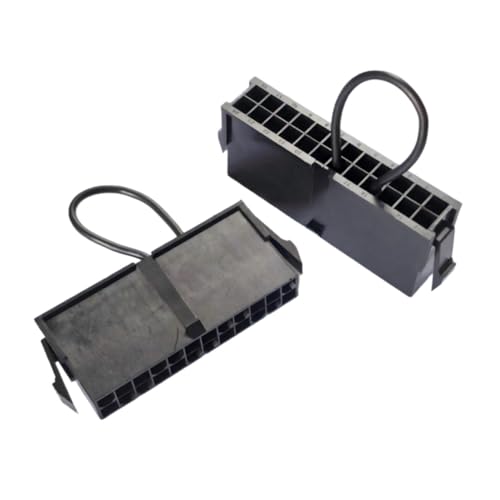
Jynprosper 2-Pack ATX PSU Jumper
Best for: Testing PSU startup without a motherboard
- Form Factor
- ATX
- Device Compatibility
- PCs
- Dimensions
- 3 × 2.75 × 0.46 inches
View on Amazon: Jynprosper 2-Pack ATX PSU Jumper Affiliate link
This Jynprosper tool is a 24-pin ATX jumper bridge designed to start power supplies without a motherboard. It features durable wire construction for secure connections and works with 20/24-pin connectors. The compact design, measuring 2.75 by 3 inches, makes it easy to handle during PC building or troubleshooting. It allows you to quickly test PSUs, fans, and mining rigs. This is a practical accessory for technicians and builders who need to verify hardware functionality.
Pros
- Activates ATX power supplies without a motherboard
- Durable wire construction for stable connections
- Plug and play design requires no tools
- Compact size for easy handling
Cons
- Only tests PSU startup, not load performance
- Does not include a 20-pin adapter
- No display or indicator lights
Good fit if
- You need to test a power supply before installation
- You are building or troubleshooting a PC
- You want a simple tool for mining rig maintenance
Skip if
- You need to test power output under load
- You require a 20-pin connector adapter
- You are looking for a power supply unit itself
Verdict: Jynprosper 24 Pin ATX Jumper Bridge is a simple, durable tool for verifying that a power supply turns on. It fits builders and technicians who need to check hardware functionality without a full system build.
Specifications side by side
| Spec | Jynprosper 2-Pack ATX PSU Jumper |
|---|---|
| Form Factor | ATX |
| Device Compatibility | PCs |
| Dimensions | 3 × 2.75 × 0.46 inches |
| Size | 1-Pack |
| Color | black-2pack |
| Model | ZXW0002 |
Frequently asked questions
What is the purpose of the Jynprosper 2-pack ATX PSU jumper?
This tool allows you to test a power supply unit without installing it into a computer case. It bridges the pins on the 24-pin ATX connector to simulate the motherboard signal. This helps you verify if the PSU turns on and functions correctly before you commit to a full build or installation.
Does this jumper work with all ATX power supplies?
It is designed for standard ATX form factor power supplies. The device plugs directly into the 20 or 24-pin motherboard power slot. You should check your specific PSU connector type to ensure compatibility. It does not replace the power supply but acts as a diagnostic bridge for startup verification.
How do I use the Jynprosper ATX jumper bridge?
Installation is straightforward and requires no tools. You simply plug the jumper bridge into the 24-pin ATX connector on the power supply unit. This action completes the circuit to simulate a motherboard connection. The power supply should then start up, allowing you to check for fan spin or other indicators.
What are the physical dimensions of this jumper?
The unit measures 2.75 inches in width, 3 inches in length, and 0.46 inches in height. These compact dimensions make it easy to store in a tool kit. The small size ensures it does not take up much space when you are not actively using it for diagnostics.
Is the Jynprosper jumper durable for repeated use?
The listing describes the unit as featuring durable wire construction. This material choice aims to provide a secure connection for stable power supply startup. You can use it repeatedly to test multiple units. The simple design reduces the risk of mechanical failure during routine hardware checks.
Who should buy this 2-pack ATX PSU jumper?
This tool fits PC builders and technicians who need to verify hardware functionality. It is ideal for checking if a power supply works before installing it in a case. You will also find it useful for troubleshooting new builds or testing used hardware without the need for a complete system setup.