Optimal Shop PC Power Supplies: 3 Picks Ranked by Specs
As an Amazon Associate we earn from qualifying purchases. Links on this page are affiliate links.
This guide covers the best optimal shop PC power supplies and related diagnostic tools. Optimal Shop offers compact testers and adapter cables designed for specific ATX form factors. We compared 3 products based strictly on their published specifications. The top pick is the Optimal Shop 20+4 Pin LCD Power Supply Tester, which leads for portable ATX power supply diagnostics. Its small dimensions and lightweight build make it practical for technicians. The list includes a budget-friendly tester and a dual PSU adapter for specialized setups. Each item is ranked by its technical attributes and intended use cases.
Quick picks
| # | Product | Best for | Price |
|---|---|---|---|
| 1 | Optimal Shop 20+4 Pin LCD Power Supply Tester Best overall | Portable ATX power supply diagnostics | Check price of Optimal Shop 20+4 Pin LCD Power Supply Tester on Amazon |
| 2 | Optimal Shop LCD ATX Power Supply Tester Best premium | Quick voltage verification of various PSU connectors | Check price of Optimal Shop LCD ATX Power Supply Tester on Amazon |
| 3 | Optimal Shop 24-Pin Dual PSU ATX Adapter Cable Best budget | Dual PSU motherboards and mining rigs | Check price of Optimal Shop 24-Pin Dual PSU ATX Adapter Cable on Amazon |
Our 3 picks
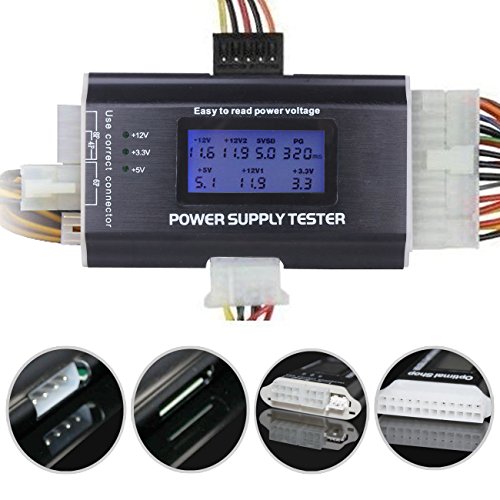
Optimal Shop 20+4 Pin LCD Power Supply Tester
Best for: Portable ATX power supply diagnostics
- Form Factor
- ATX
- Display Type
- LCD Display
- Dimensions
- 8.3 × 3.7 × 0.8 inches
- Weight
- 3.2 ounces
View on Amazon: Optimal Shop 20+4 Pin LCD Power Supply Tester Affiliate link
This is an 8-in-1 ATX power supply tester with a 1.8-inch LCD screen. It checks 20-pin, 24-pin, SATA, and PCIe connectors. The aluminum shell keeps it light at 3.2 ounces. A buzzer alerts you to PG failures. You get clear voltage readings for +12V, +5V, and +3.3V. It suits technicians who need a portable, reliable tool for diagnosing PSU issues.
Pros
- Supports 20-pin, 24-pin, SATA, and PCIe connectors
- 1.8-inch LCD displays output voltage clearly
- Aluminum alloy shell for durability and portability
- Buzzer alarm signals PG number failures
Cons
- Screen requires manual removal of protective film
- Only tests specific connector types, not all
- No data on long-term durability or warranty
Good fit if
- You need a portable tool for quick PSU checks
- You work with various ATX connector standards
- You prefer visual voltage readings over blinking lights
Skip if
- You require a tester for non-ATX power supplies
- You want a device with a built-in battery
- You need a tester with a larger display screen
Verdict: Optimal Shop ATX PSU Tester with LCD is a practical choice for technicians who need a lightweight, portable tool for diagnosing PSU issues across multiple connector types.

Optimal Shop LCD ATX Power Supply Tester
Best for: Quick voltage verification of various PSU connectors
- Form Factor
- ATX
- Display Type
- LCD Display
View on Amazon: Optimal Shop LCD ATX Power Supply Tester Affiliate link
This Optimal Shop tool is an 8-in-1 ATX power supply tester designed to verify connector health. It features a 1.8-inch LCD screen that displays output voltage for 20-pin, 24-pin, and other connectors. A buzzer alarm signals PG number failures. The aluminum alloy shell is light and corrosion-resistant. It suits builders who need to quickly validate PSU outputs before installing components.
Pros
- Tests 8 connector types including SATA, PCIe, and IDE
- 1.8-inch LCD screen shows voltage readings
- Buzzer alarm indicates PG number failures
- Aluminum alloy shell for durability and portability
Cons
- Screen is prone to scratches without protective film
- Does not test main 24-pin motherboard power delivery under load
- Limited to voltage verification rather than full stability testing
Good fit if
- You need to verify PSU connector voltages quickly
- You want a portable tool with an LCD display
- You build PCs with various connector types
Skip if
- You require load testing for power stability
- You prefer a rugged screen without protective film
- You only test standard 24-pin ATX connectors
Verdict: Optimal Shop 8-in-1 PSU Tester is a practical tool for verifying connector voltages. It fits users who need to check multiple connector types quickly. The LCD display and buzzer alarm provide clear feedback for basic PSU validation.

Optimal Shop 24-Pin Dual PSU ATX Adapter Cable
Best for: Dual PSU motherboards and mining rigs
- Form Factor
- ATX
View on Amazon: Optimal Shop 24-Pin Dual PSU ATX Adapter Cable Affiliate link
This adapter lets you connect two power supplies to a single motherboard. It supports both 20-pin and 24-pin ATX connectors. The cable is 12.6 inches long and black. You can use it for dual PSU gaming or mining setups. It synchronizes power on and off for both units. This tool is useful for building systems that require extra power delivery.
Pros
- Enables dual power supply connection to one motherboard
- Supports 20-pin and 24-pin ATX connectors
- Synchronizes power on/off for both units
- Cable length is 12.6 inches
Cons
- Requires two separate power supplies to function
- Limited to ATX form factor motherboards
- No display or status indicators included
Good fit if
- You need to power multiple graphics cards
- You are building a dual PSU mining rig
- You want to synchronize power for two units
Skip if
- You only have one power supply
- You need a non-ATX motherboard connection
- You want a single cable for one PSU
Verdict: Optimal Shop 24-Pin Dual PSU Adapter is a practical solution for users needing dual power delivery. It fits builders who require synchronized power for mining or high-end gaming setups.
Specifications side by side
| Spec | Optimal Shop 20+4 Pin LCD Power Supply Tester | Optimal Shop LCD ATX Power Supply Tester | Optimal Shop 24-Pin Dual PSU ATX Adapter Cable |
|---|---|---|---|
| Form Factor | ATX | ATX | ATX |
| Display Type | LCD Display | LCD Display | not stated |
| Dimensions | 8.3 × 3.7 × 0.8 inches | not stated | not stated |
| Weight | 3.2 ounces | not stated | not stated |
| Color | Black | Golden | Black |
| Model | Optimal Shop | Optimal Shop | Optimal Shop |
| Size | not stated | not stated | 12.6 inches |
Optimal Shop PSU Tools Ranked by Specs
The Optimal Shop lineup focuses on ATX diagnostics and connectivity. You can choose based on form factor and display type. The Optimal Shop 20+4 Pin LCD Power Supply Tester offers a compact ATX design with an LCD display. It measures 3.7 by 8.3 inches and weighs 3.2 ounces. This makes it ideal for portable ATX power supply diagnostics. Technicians need lightweight tools for diagnosing PSU issues across multiple connector types. The LCD provides clear visual feedback for basic validation. This model serves as a practical choice for field work. You get a dedicated unit for quick checks. The size fits easily in a tool bag. You can carry it anywhere without bulk. This setup supports efficient workflow for mobile repairs. The device is built for specific ATX requirements. It handles various connector types with ease. The display ensures accurate readings every time. You rely on this spec for daily tasks.
Who Optimal Shop Suits Best
Optimal Shop targets technicians and builders needing specific ATX diagnostics. The range spans from lightweight, portable testers to dedicated adapter cables. You get compact units with LCD displays for clear voltage feedback. Sizes vary from slim diagnostic tools to longer 12.6-inch cables. There are no wireless options, smart app integrations, or large UPS units in this lineup. You will not find multi-output server-grade supplies here. This brand suits users who need quick, portable verification of PSU connectors or simple dual-power adapters for mining and high-end setups. It does not cover comprehensive power backup or complex server infrastructure.
How to Choose the Right PSU Tool
-
Check Display Type
Look for an LCD display if you need clear voltage readings. The Optimal Shop 20+4 Pin LCD Power Supply Tester includes this feature for precise diagnostics. An LCD screen allows you to verify output levels without connecting to a motherboard. This is essential for technicians who need to confirm power stability before installing components. Ensure the display is visible and easy to read during testing procedures.
-
Verify Connector Compatibility
Ensure the tester supports your specific ATX connectors. The Optimal Shop 20+4 Pin model is designed for portable ATX power supply diagnostics. It handles multiple connector types to verify voltages quickly. Check the product specifications to confirm it fits your motherboard’s power cable. Using a compatible tool prevents damage and ensures accurate readings. This step is critical for validating PSU health across different system configurations.
-
Consider Portability
Select a lightweight unit if you move between workstations. The top-rated tester weighs only 3.2 ounces and measures 8.3 inches in length. Its compact form factor makes it easy to carry in a toolkit. Portability is key for technicians who diagnose issues on-site. A smaller device reduces strain during extended testing sessions. Verify the dimensions in the specs to ensure it fits your workspace constraints.
-
Assess Feedback Mechanisms
Look for buzzer alarms for immediate error detection. The Optimal Shop 8-in-1 PSU Tester includes a buzzer for clear feedback. This feature alerts you to voltage irregularities without constant screen monitoring. It is useful for quick verification of various PSU connectors. Choose a model with audible alerts if you prefer hands-free operation. This enhances safety and efficiency during routine power supply validation tasks.
-
Match Cable Length
Check cable length for dual PSU setups. The Optimal Shop 24-Pin Dual PSU Adapter Cable is 12.6 inches long. This length suits mining rigs and high-end gaming builds requiring synchronized power. Ensure the cable fits your case layout and motherboard spacing. Longer cables provide flexibility in cable management. Verify the size specifications to avoid tight bends or insufficient reach in your build.
Frequently asked questions
Which Optimal Shop PSU tester is best for portable diagnostics?
The Optimal Shop 20+4 Pin LCD Power Supply Tester is the top pick for technicians needing a lightweight, portable tool. It measures 3.7 inches wide and 8.3 inches long, weighing only 3.2 ounces. The compact ATX form factor and LCD display make it easy to carry and use for diagnosing issues across multiple connector types.
Does Optimal Shop offer a budget-friendly PSU tester?
Yes, the Optimal Shop LCD ATX Power Supply Tester is ranked as the best budget option. It is designed for quick voltage verification of various connectors. This tool features an LCD display and a buzzer alarm to provide clear feedback during basic PSU validation, making it practical for checking multiple connector types quickly.
What is the best adapter for dual PSU setups?
The Optimal Shop 24-Pin Dual PSU ATX Adapter Cable is the recommended choice for dual power delivery. It is ideal for builders using dual PSU motherboards or mining rigs. The black cable measures 12.6 inches in size, providing a synchronized power solution for high-end gaming or specialized computing setups.
Do Optimal Shop testers include LCD displays?
Yes, both the top-ranked and budget testers feature LCD displays. The Optimal Shop 20+4 Pin LCD Power Supply Tester includes this for precise diagnostics. Similarly, the Optimal Shop LCD ATX Power Supply Tester uses its screen for clear voltage feedback. These displays allow you to verify output levels accurately without needing external equipment.
How big is the portable Optimal Shop tester?
The Optimal Shop 20+4 Pin LCD Power Supply Tester is highly compact. It measures 3.7 inches in width, 0.8 inches in height, and 8.3 inches in length. Weighing just 3.2 ounces, its small ATX form factor ensures it fits easily into toolkits for portable diagnostics and on-the-go troubleshooting.
What connectors do the Optimal Shop testers support?
The testers are designed for ATX form factors and support multiple connector types. The 20+4 Pin tester diagnoses issues across various connectors. The 8-in-1 budget tester verifies voltages for different connector types. Both tools help you quickly validate power supply outputs using their respective LCD displays and alarm systems.
Is the dual PSU adapter suitable for mining?
Yes, the Optimal Shop 24-Pin Dual PSU ATX Adapter Cable is suitable for mining rigs. It provides a practical solution for users needing dual power delivery. The 12.6-inch black cable ensures synchronized power for high-end gaming setups or mining operations, making it a reliable choice for specialized builder requirements.